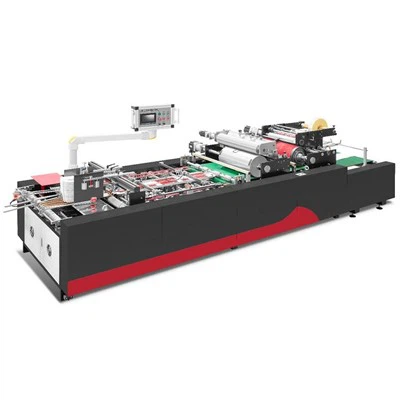
As a supplier of Touch Screen Air Pressing Machines, I understand the frustration when your equipment fails to start. This blog post aims to provide a comprehensive guide on troubleshooting a Touch Screen Air Pressing Machine that won't start. By following these steps, you can identify and resolve common issues, minimizing downtime and getting your machine back up and running efficiently.
Step 1: Check the Power Supply
The first and most basic step is to ensure that the machine is properly connected to a power source. Check the power cord to make sure it is securely plugged into both the machine and the electrical outlet. If possible, try plugging the machine into a different outlet to rule out any issues with the electrical supply.
Inspect the power switch on the machine itself. Sometimes, the switch may be accidentally turned off or in a faulty position. Flip the switch on and off a few times to ensure it is making proper contact. If the switch appears to be damaged, it may need to be replaced.
Step 2: Examine the Circuit Breaker
If the machine still doesn't start after checking the power supply, the next step is to look at the circuit breaker. The circuit breaker is designed to protect the machine from electrical overloads. If it has tripped, it will cut off the power to the machine.
Locate the circuit breaker panel in your facility and find the breaker that corresponds to the Touch Screen Air Pressing Machine. If the breaker is in the "off" position, flip it back to the "on" position. If it trips again immediately, there may be a short circuit or other electrical issue that requires professional attention.
Step 3: Check the Touch Screen Display
The touch screen display is an integral part of the machine's operation. If it is not functioning properly, it can prevent the machine from starting. Start by checking the display for any visible damage, such as cracks or scratches. If the display is damaged, it will need to be replaced.
Next, try cleaning the touch screen with a soft, dry cloth. Sometimes, dirt or debris on the screen can interfere with its sensitivity. If cleaning the screen doesn't solve the problem, you may need to recalibrate the touch screen. Refer to the machine's user manual for instructions on how to perform a recalibration.
Step 4: Inspect the Air Supply
Touch Screen Air Pressing Machines rely on compressed air to operate. If the air supply is interrupted or insufficient, the machine may not start. Check the air compressor to make sure it is running and producing the correct amount of pressure. The air pressure should be within the range specified in the machine's user manual.
Inspect the air hoses and fittings for any signs of damage or leaks. A leak in the air supply can cause a drop in pressure and prevent the machine from functioning properly. If you find a leak, repair or replace the damaged hose or fitting.
Step 5: Check the Safety Interlocks
Most Touch Screen Air Pressing Machines are equipped with safety interlocks to prevent accidents. These interlocks are designed to stop the machine if certain conditions are not met, such as the doors being open or the guards not in place.
Check all the safety interlocks on the machine to make sure they are functioning properly. Make sure all the doors are closed and latched, and all the guards are in place. If any of the interlocks are triggered, the machine will not start. Reset the interlocks and try starting the machine again.
Step 6: Review the Machine's Settings
Sometimes, a simple setting change can cause the machine to stop working. Review the machine's settings to make sure they are correct. Check the temperature settings, pressure settings, and any other relevant parameters. Make sure they are within the recommended range for the specific job you are performing.


If you are unsure about any of the settings, refer to the machine's user manual or contact our technical support team for assistance. We are always happy to help you optimize the settings for your machine to ensure optimal performance.
Step 7: Look for Error Messages
Many Touch Screen Air Pressing Machines are equipped with diagnostic systems that can display error messages when a problem occurs. Check the touch screen display for any error messages. The error message will usually provide some clues about what is causing the problem.
Refer to the machine's user manual or the troubleshooting guide to interpret the error message. Follow the recommended steps to resolve the issue. If you are unable to resolve the problem based on the error message, contact our technical support team for further assistance.
Step 8: Consider Professional Maintenance
If you have followed all the above steps and the machine still doesn't start, it may be time to call in a professional. Our team of experienced technicians is trained to diagnose and repair Touch Screen Air Pressing Machines. We have the tools and expertise to quickly identify the problem and get your machine back up and running.
Regular maintenance is also important to prevent future problems. We offer comprehensive maintenance packages to keep your machine in top condition. Our technicians will perform routine inspections, cleanings, and lubrications to ensure that your machine is operating at its best.
Conclusion
Troubleshooting a Touch Screen Air Pressing Machine that doesn't start can be a challenging task, but by following these steps, you can often identify and resolve the problem on your own. If you need further assistance, our technical support team is always available to help.
We are proud to offer a wide range of high-quality Touch Screen Air Pressing Machines, including the MC-PY-8 Touch Screen Air Pressing Machine. Our machines are designed to provide reliable performance and precision in a variety of applications.
In addition to our Touch Screen Air Pressing Machines, we also offer other types of equipment, such as the LS-1200C Automatic Dual-direction Grooving Machine and the MC-ZE450 Tucking In and Folding Machine. These machines are designed to meet the needs of the packaging industry and provide efficient and cost-effective solutions.
If you are interested in learning more about our products or have any questions about troubleshooting or maintenance, please contact us. We look forward to working with you to meet your packaging equipment needs.
References
- Manufacturer's user manual for the Touch Screen Air Pressing Machine
- Technical documentation provided by the machine's manufacturer
- Industry best practices for troubleshooting and maintaining packaging equipment