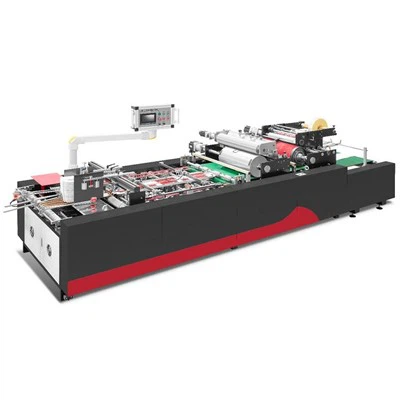
Electrical issues in a rigid box machine can be a significant headache for operators and manufacturers alike. As a trusted supplier of rigid box machines, I understand the importance of quickly identifying and resolving these problems to minimize downtime and maintain productivity. In this blog post, I'll share some practical tips on how to troubleshoot electrical problems in a rigid box machine.


Understanding the Basics of Rigid Box Machine Electrical Systems
Before diving into troubleshooting, it's essential to have a basic understanding of the electrical systems in a rigid box machine. These machines typically consist of a power supply unit, control panel, motors, sensors, and various electrical components. The power supply unit provides electricity to the entire machine, while the control panel manages the operation of different parts through a series of electrical signals.
Motors are responsible for driving the mechanical components of the machine, such as conveyors, cutters, and folding mechanisms. Sensors, on the other hand, are used to detect the position, presence, or movement of materials and parts within the machine. Any malfunction in these electrical components can lead to operational problems.
Common Electrical Problems and Their Symptoms
1. Power Supply Issues
- Symptom: The machine fails to start or suddenly shuts down. There may be no power indicator lights on the control panel.
- Cause: A blown fuse, tripped circuit breaker, or a faulty power cord can cause power supply problems. Additionally, issues with the electrical outlet or power source can also lead to these symptoms.
- Troubleshooting: Check the circuit breaker and reset it if it has tripped. Inspect the fuse and replace it if it is blown. Examine the power cord for any signs of damage, such as cuts or frayed wires. If the problem persists, test the electrical outlet with another device to ensure it is working properly.
2. Motor Malfunctions
- Symptom: The motor fails to start, runs slowly, or makes unusual noises. There may also be a burning smell coming from the motor.
- Cause: Motor malfunctions can be caused by a variety of factors, including overheating, worn-out bearings, or electrical shorts. Inadequate lubrication can also lead to increased friction and motor failure.
- Troubleshooting: Check the motor's power supply and ensure that it is receiving the correct voltage. Inspect the motor for any signs of damage, such as burnt wires or melted insulation. If the motor is overheating, check the cooling system and ensure that it is functioning properly. If the motor still does not work, it may need to be replaced.
3. Sensor Failures
- Symptom: The machine may misfeed materials, make incorrect cuts, or fail to detect the presence of materials. The control panel may display error messages related to sensor malfunctions.
- Cause: Sensor failures can occur due to dirt, dust, or debris on the sensor surface. Physical damage to the sensor or a loose connection can also cause problems.
- Troubleshooting: Clean the sensor surface using a soft, dry cloth to remove any dirt or debris. Check the sensor's connection to the control panel and ensure that it is secure. If the sensor is damaged, it may need to be replaced.
4. Control Panel Issues
- Symptom: The control panel may display error messages, freeze, or fail to respond to input commands. There may also be issues with the display screen, such as flickering or incorrect readings.
- Cause: Control panel problems can be caused by software glitches, electrical shorts, or damaged components. Overheating or power surges can also lead to control panel malfunctions.
- Troubleshooting: Restart the control panel by turning off the machine and then turning it back on. If the problem persists, check the control panel's connections and ensure that all cables are securely plugged in. If the display screen is malfunctioning, check the backlight and the display settings. If the issue cannot be resolved, it may be necessary to contact a professional technician for further diagnosis and repair.
Step-by-Step Troubleshooting Process
1. Gather Information
- Before starting the troubleshooting process, gather as much information as possible about the problem. This includes the symptoms, the time when the problem occurred, and any recent changes or maintenance performed on the machine.
- Check the machine's operation manual and maintenance records for any relevant information or troubleshooting guides.
2. Visual Inspection
- Perform a visual inspection of the machine to look for any obvious signs of damage or wear. Check the power cords, cables, and connections for any loose or frayed wires.
- Inspect the electrical components, such as motors, sensors, and control panels, for any signs of overheating, burning, or physical damage.
3. Isolate the Problem
- Based on the symptoms and the visual inspection, try to isolate the problem to a specific electrical component or system. This can help you focus your troubleshooting efforts and save time.
- Use a multimeter or other electrical testing equipment to check the voltage, resistance, and continuity of the electrical components.
4. Test and Replace Components
- Once you have identified the faulty component, test it using the appropriate testing equipment. If the component is found to be defective, replace it with a new one.
- Make sure to use the correct replacement part and follow the manufacturer's instructions for installation.
5. Test the Machine
- After replacing the faulty component, test the machine to ensure that the problem has been resolved. Run the machine through a few cycles and check for any remaining issues.
- If the problem persists, repeat the troubleshooting process or contact a professional technician for further assistance.
Preventive Maintenance Tips
- Regular Cleaning: Keep the machine clean and free of dirt, dust, and debris. This can help prevent sensor failures and other electrical problems.
- Lubrication: Follow the manufacturer's recommendations for lubricating the machine's moving parts. Proper lubrication can reduce friction and prevent motor overheating.
- Inspection and Testing: Perform regular inspections and tests of the electrical components to detect any potential problems early. This can help prevent major breakdowns and costly repairs.
- Training: Provide proper training to the machine operators on how to operate and maintain the machine correctly. This can help prevent operator errors and reduce the risk of electrical problems.
Our Rigid Box Machines
As a leading supplier of rigid box machines, we offer a wide range of high-quality machines to meet the diverse needs of our customers. Our LS-900A Bi-channel Fully Automatic Rigid Box Making Machine is designed for high-speed production of rigid boxes with excellent precision and quality. The LS-1200F Automatic Cardboard Slitting Machine is a reliable solution for accurately slitting cardboard sheets. And our LS-450Plus Automatic Positioning Machine ensures precise positioning of materials during the box-making process.
Contact Us for Purchase and Technical Support
If you are experiencing electrical problems with your rigid box machine or are interested in purchasing a new machine, please feel free to contact us. Our team of experts is ready to provide you with professional advice and support. We can help you troubleshoot any issues, offer maintenance services, and assist you in selecting the right machine for your specific requirements.
References
- Electrical Troubleshooting Guide for Industrial Machines, Manufacturer's Manual
- Principles of Electrical Systems in Packaging Machinery, Industry Handbook