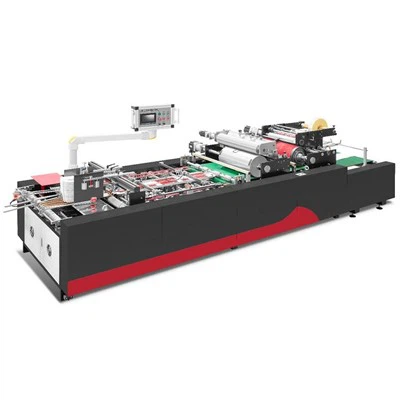
Hey there! As a supplier of Touch Screen Air Pressing Machines, I'm stoked to walk you through the installation process. Whether you're a newbie in the industry or just looking to set up a new machine, this guide will help you get your Touch Screen Air Pressing Machine up and running smoothly.
Pre - installation Checks
Before we start the actual installation, there are a few things you need to do. First off, find a suitable location for your machine. The area should be clean, dry, and well - ventilated. Make sure there's enough space around the machine for easy access and maintenance. You don't want to end up in a tight spot where you can't reach certain parts of the machine.


Check the power supply. Your Touch Screen Air Pressing Machine requires a stable power source. The voltage should match the machine's specifications. It's a good idea to use a voltage stabilizer to protect the machine from power surges.
Also, take a good look at the machine itself. Inspect it for any visible damage during transit. Check all the components, cables, and connectors. If you find anything wrong, don't hesitate to contact us right away.
Gathering the Tools
You'll need a set of basic tools for the installation. A screwdriver set is a must - have. You'll use it to tighten or loosen screws on the machine. A wrench might also come in handy for some parts. And don't forget a measuring tape. You'll need it to ensure the machine is properly aligned.
Unpacking the Machine
Carefully unpack the Touch Screen Air Pressing Machine. Keep all the packing materials in case you need to move the machine later. Lay out all the components on a clean surface. You should have the main machine body, control panel, power cable, and any additional accessories.
Mounting the Machine
Now, it's time to mount the machine on a stable surface. Most of our Touch Screen Air Pressing Machines come with pre - drilled holes for easy mounting. Place the machine on the chosen surface and align it using the measuring tape. Make sure it's level. You can use a spirit level to check this.
Once it's aligned, use the screws and the screwdriver to secure the machine to the surface. Tighten the screws firmly, but don't over - tighten them as it might damage the machine or the mounting surface.
Connecting the Cables
Connect the power cable to the machine. Make sure it's properly plugged in. Then, connect any other cables such as the data cables for the touch screen. These cables are usually color - coded, so it's easy to match them up.
Installing the Software
If your Touch Screen Air Pressing Machine comes with software, you'll need to install it. Insert the software CD into your computer's CD - ROM drive. Follow the on - screen instructions to complete the installation. It's a pretty straightforward process, but if you run into any issues, our support team is just a call away.
Calibrating the Machine
Calibration is a crucial step. It ensures that the touch screen responds accurately to your touch. Most of our machines have a built - in calibration function. Follow the instructions in the user manual to calibrate the touch screen. Usually, you'll need to touch a series of points on the screen to complete the calibration.
Testing the Machine
After installation and calibration, it's time to test the machine. Power it on and check if all the functions are working properly. Try pressing different areas on the touch screen and see if the machine responds as it should. If you notice any problems, such as unresponsive areas on the screen or strange noises from the machine, stop the test immediately and contact us.
Additional Tips
If you're looking for other related machines, we also offer some great options like the LS - 450Plus Automatic Positioning Machine, the LS - 40A Corner Pasting Machine, and the LS - 900C Bi - channel Visual Positioning Machine. These machines can work in tandem with your Touch Screen Air Pressing Machine to enhance your production efficiency.
Contact for Purchase and Consultation
If you're interested in purchasing a Touch Screen Air Pressing Machine or have any questions about the installation process, feel free to reach out to us. We're always here to help you make the best decision for your business. Our team of experts can provide you with detailed information, offer customized solutions, and assist you throughout the entire process.
References
- Manufacturer's User Manual for Touch Screen Air Pressing Machine
- Technical Specifications of Related Machines